CreateSpace is my go to for my self-publishing needs. It was pretty easy to learn, but I figured I’d give any tips to those interested in CreateSpace. You can self-publish with CreateSpace for FREE as long as you keep your book to the basic options.
First, you’ll need to set up an account. Once you set up an account and log in, it should take you to the “Member Dashboard” where you can see all your titles and projects you’ve created in CreateSpace as well as there ID numbers and the royalties you’ve received.
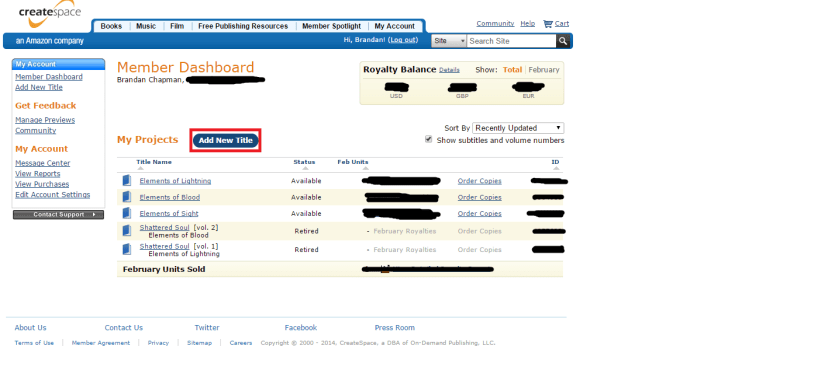
From here, you can click the “Add New Title” button. This will take you to the page where you can select what you are self-publishing, whether it be a book, CD, or DVD. As I am an author, and not creating CDs or DVDs, this will be general to creating paperback projects. You can see my 3 current books and the older editions of my first 2 listed here.
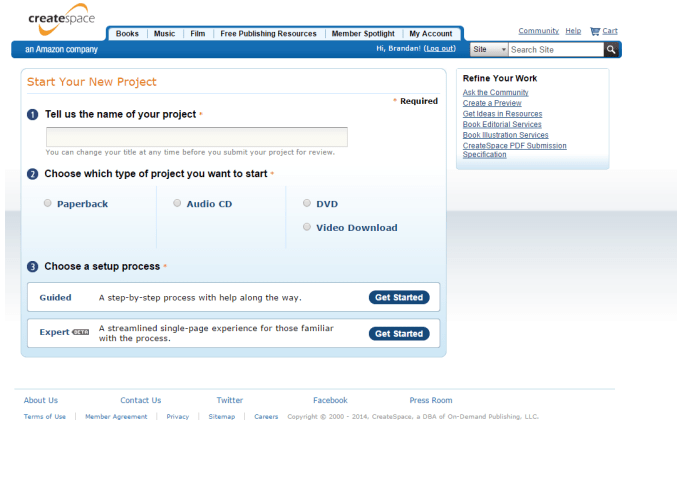
You have to name your project, most likely the book’s title, select the paperback option, and then select the guided process. There is an “expert” process that is in beta apparently, but if it’s your first time using CreateSpace, best to stick to the guided option.
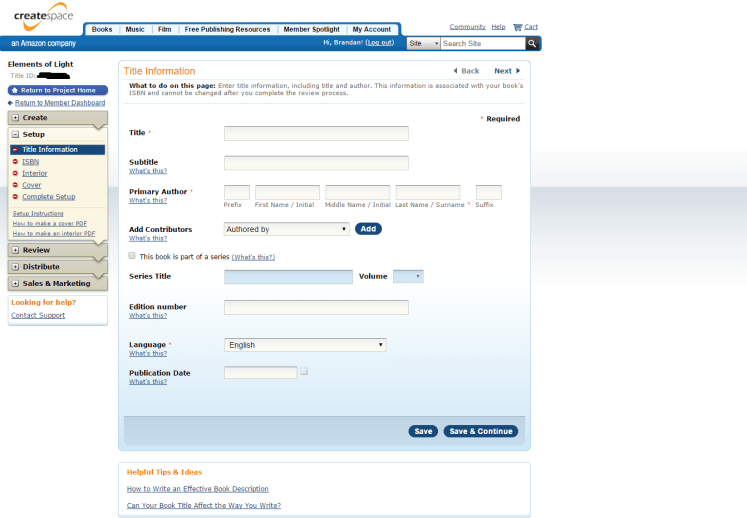
After it loads your new project, you’ll find yourself on the “Title Information” page under Setup for your project. Here you can add a subtitle (if you have one), the author’s name (in case you use a pen name), extra contributors (like designed by, photographs by, etc.), if the book is part of a series (which is optional), edition number, language, and finally the publication date. Each section has a “What’s This?” underneath it with more information regarding each one.
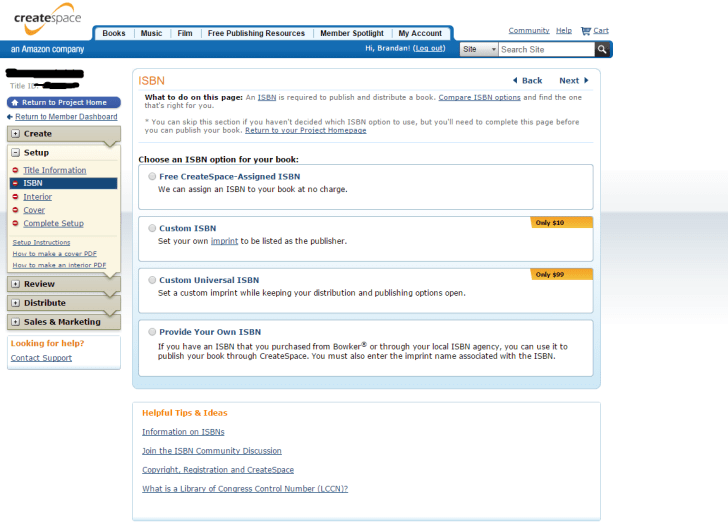
After you save and continue (after you save you can always come back to edit the project), you’ll find yourself on the ISBN page. Here you can get a free ISBN through CreateSpace or purchase a custom ISBN. You can also provide your own if you have bought one previously. There is a link to compare the ISBN options near the top.
For the next page, you’ll need your completed, edited, and formatted manuscript. I don’t have a picture for the next pages because I don’t have the required files/information to make the pages appear as they would for someone who is entering all the information in. The Interior page is where you choose the interior type (being black & white or full color), paper color (between white or cream), trim size (how large your pages and book will be), and where you submit your file. The color options are obviously going to probably cost you, I’m not actually sure, as I have only done black & white interior and white pages. There also is an option here for $199 for CreateSpace to professionally design your interior. This is NOT paying for them to EDIT. It’s to DESIGN your manuscript. Like I said before, you can get through this completely free if you know how to edit your document yourself.
Next is the cover! Here you can choose between having a glossy shiny cover, or a matte cover which is just a regular non-shiny cover. You can order samples to see what they look like but that’ll cost you. After you choose between the finish of your cover, you have three options: Build your own cover with CreateSpace’s limited cover designer, pay $399 dollars to have them design you a cover, or upload a cover-ready PDF. If you don’t have a full cover ready as a PDF, you can make your own for free. The designer is limited with fonts and templates, but it’ll get the job down if you just have like a photograph you want as your cover. If you have no picture editing skills, or can’t find someone who does, you should make your own cover with their designer. Or if you have 400 dollars. GIMP is an excellent program to use for photo editing. It’s like Photoshop but free, and pretty simple to use.
You did it! After all this you have come to the Complete Setup page. Here you review the information you have selected for your book. After everything is exactly as you want it, you submit your file(s) for review. It takes about 24 hours before they get back to you. During these 24 hours you can’t edit anything you have selected. This review is to see if your manuscript file and your cover file match up and there are no errors. If there are errors, you’ll have to fix them and resubmit and wait another 24 hours. If there isn’t any errors, then you are good to go. You can digitally proof your book (to see if there are any errors that it didn’t catch) or you can order a proof copy to read in person. You’ll have to wait if you order a copy, but if you proof it digitally, you can move on and begin the process of distributing your book.
The Distribute section is where you enter your price, your book description, what channels you want your book to be available to, and if you want to publish the book on Kindle. They are all self explanatory. To publish on Kindle, it’ll simply convert your files to eBook format and publish it that way as well. For pricing, there is a minimum price that you can set your book. Depending how long/big the book is, the higher the minimum price will be.
Hopefully this will help shed some light on the guided process of self-publishing a book through CreateSpace. There are several other self-publishing sites that you can use if CreateSpace isn’t your cup of tea, but it’s the only one I’ve used. Explore your options, but if you do decide on CreateSpace, hopefully this will help.
If you have any more questions on CreateSpace, feel free to ask me or even visit the forums.
 Brandan Chapman